手順
ノード構成Reticleの部分。カメラの子要素ではないので注意
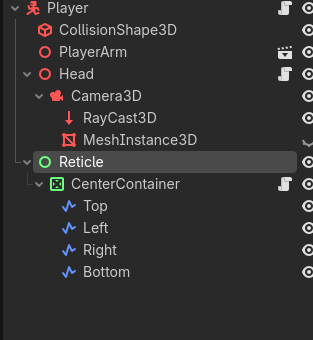
①Controlノードを出す。
AnchorsPresetをFullRectに
Mouse – Filter をPassに
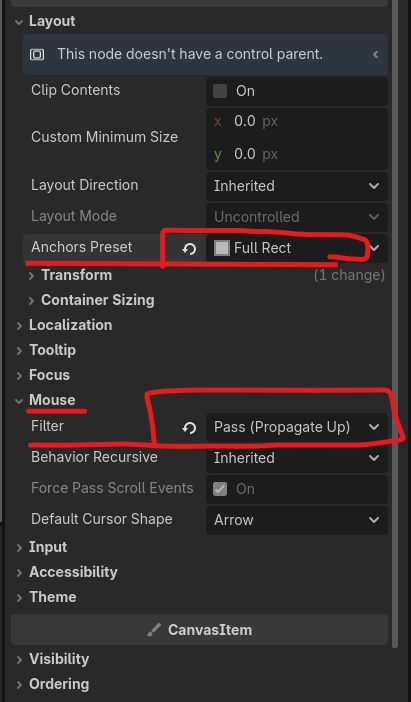
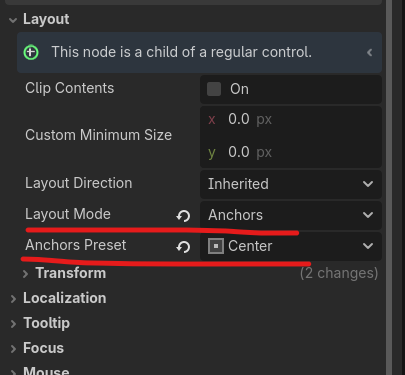
②その子要素にCenterContainerノードを出す。
LayoutModeをAnchorsに
AnchorsPresetはCenter
③2で作ったノードにScriptをアタッチする。
これで真ん中にシンプルな円形が出る
extends CenterContainer

@export var dot_radius:float = 1.0
@export var dot_color:Color = Color.WHITE


# Called when the node enters the scene tree for the first time.
func _ready() -> void:
	queue_redraw()


# Called every frame. 'delta' is the elapsed time since the previous frame.
func _process(delta: float) -> void:
	pass


func _draw():
	draw_circle(Vector2(0,0),dot_radius,dot_color)
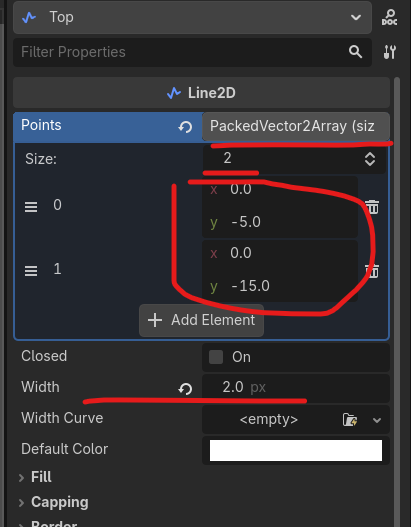
④孫要素としてLine2Dノードを出し、十字を作っていく。
とりあえずTopだけSizeやy値、その下のWidthを変更して出してみる。問題ないならノードを複製し他の3つを作ると楽
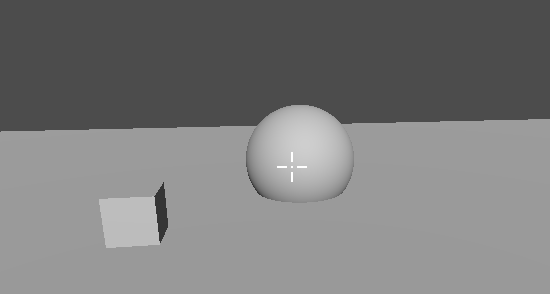
完成形はこんな感じ